
In this article
Share with your community!


Edited & Reviewed
 Edited & Reviewed
Reading time 3 mins
Updated on September 16, 2025
In this article
Share with your community!
Managing endpoints effectively requires more than just reacting to problems. The right balance combines proactive configuration, targeted remediation, and quality monitoring.
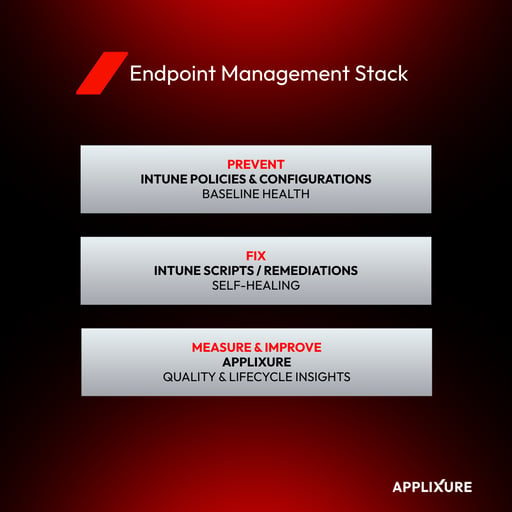
Microsoft Intune Policies and Configurations - Setting the Baseline
The first line of defense is to prevent issues before they occur. Microsoft Intune policies and configuration profiles enforce:
- Update reliability with Windows Update for Business rings and feature update policies
- Security hardening with Defender, ASR rules, and BitLocker baselines
- Standardization of local admin rights, default applications, and device restrictions
With these in place, devices start in a healthy state and stay aligned to it.
Intune Scripts - Handling Auto-Remediations
Some problems can’t be eliminated by configuration alone because they depend on user behavior or runtime conditions. These are best solved with lightweight self-healing scripts deployed through Intune’s Remediations or Platform Scripts. Examples include:
- Clearing cache files from Outlook, Teams, or OneDrive
- Removing temporary files and unused profiles to reclaim disk space
- Resetting Windows Update components when the cache becomes corrupt
- Disabling Fast Startup
One of Intune’s strengths is the massive community behind it. You don’t necessarily need to be a PowerShell expert, as there are thousands of scripts shared publicly by Microsoft and the community.
That said, a disclaimer is necessary: Always understand what a script does before deploying it. Scripts typically run with the highest privileges, and if misused, they can cause more harm than good. This is also why it’s crucial to have control over what you deploy. Some DEX tools have built-in auto-remediation script libraries that are managed and updated by someone else.
Used this way, Intune scripts act as a safety net, delivering self-healing fixes for common endpoint problems without the need for large third-party auto-remediation libraries. In fact, many DEX tools that advertise large script libraries are simply duplicating what Intune, or other endpoint management tools, already provide, making them redundant and adding unnecessary cost.
Applixure - Measuring What Really Matters
While Intune is strong at enforcing compliance and policies, it does not do well at reporting real-time issues or user experience trends. This is where Applixure comes in:
- Defining and tracking quality metrics for security, manageability, and end-user experience
- Highlighting actual end-user issues as they happen, rather than just policy states
- Providing a holistic view of endpoint environment health
- Track device age, usage patterns, and overall health trends, helping IT decide when devices should be upgraded, replaced, or repurposed. By combining technical quality data with lifecycle insights, organizations avoid premature replacements while also reducing downtime caused by aging hardware.
When paired with Intune’s auto-remediation capabilities, Applixure’s insights ensure that issues are not only identified but also resolved quickly.
| Tool | Primary Role | Examples |
|---|---|---|
| Intune Policies | Prevent issues / enforce baseline | Updates, security, restrictions |
| Intune Scripts | Auto-remediate runtime issues | Clear caches, fix WU, reclaim disk |
| Applixure | Measure experience & lifecycle health | Quality metrics, device aging, issue trends |
Stay Ahead in IT
Get monthly insights and guides for smarter IT management
No spam. Unsubscribe anytime.