
In this article
Share with your community!


Edited & Reviewed
 Edited & Reviewed
Reading time 3 mins
Updated on October 26, 2026
In this article
Share with your community!
Analysts expect PC prices to stay high through 2027. If your PC refresh budget assumed a cheaper market, it will buy less than planned. If your budget isn't final yet, there's still time to adjust: switch to condition-based replacement and spend only on the computers that really need replacing.
What do analysts expect for 2027?
Prices stay high, with brief discounts at most.
- Gartner, 21 Oct 2026: device spending up 8.1% to $916 billion in 2027. Memory prices have more than doubled in 12 months, and the pressure is expected to last through 2027. Source
- IDC, June 2026: average PC prices up 18.3% in 2026; a return to 2025 pricing is not expected. Source
- IDC, October 2026: promotions may bring short-term relief, but prices stay well above 2025 levels. Source
What does this mean for your IT budget?
Your money buys fewer computers, and waiting won't fix that.
- Less for the same money: at an 18.3% average price rise, a budget that bought 100 PCs at 2025 prices buys roughly 85 at 2026 prices.
- Every unnecessary replacement costs more: retiring a computer that still works is now more expensive than ever.
- Waiting isn't a plan: a blanket delay pushes purchases into a market forecast to stay expensive, while failing machines stay in service.
- There's still time to adapt: if your FY27 budget isn't final, you can still change what goes on the refresh list.
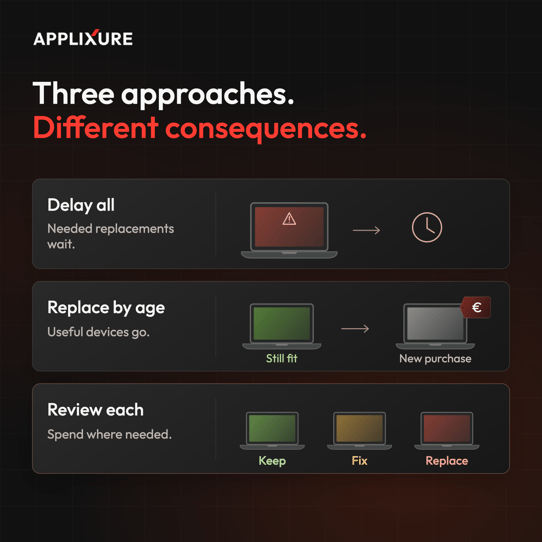
What are your options?
You have three. Only one avoids paying more for computers you don't need.
- Option 1: Delay across the board. Spending falls at first, but purchases land later in a market forecast to stay expensive, and failing devices stay in use.
- Option 2: Keep replacing by age. You buy the full list at today's prices, including devices that are still fit for use.
- Option 3: Replace by condition. (Recommended) You keep healthy devices, fix the ones that need it and replace only the ones that must go.
Age tells you when a device was bought, not whether it still does the job. At South Ostrobothnia Wellbeing Services County, 70% of four-year-old laptops and 79% of desktops due for replacement were still fit for use.
.png?width=1920&height=1080&name=Hyvaa%20EP%20Case%20Facts%20(1).png)
"When new computers cost more, the smartest investment is keeping the computers you already have healthy," says Harri Turtiainen, CEO of Applixure. "Waiting for prices to drop isn't a plan. Look after the fleet you own, extend when you can, and replace when you must, based on what the data says about each device."
How easy is it to switch to condition-based replacement?
Very easy. Applixure does the analysis, and you act on the result.
- Deploy Applixure on the computers you want to assess. This takes 15 minutes.
- Collect data on performance, stability, hardware health and usage.
- Get your Lifespan Analysis: extend, fix or replace, for every computer.
Start now and you'll have results in about a month, while you can still adjust your FY27 orders. Lifespan Analysis is available for organisations with 200+ computers.
Want to see a real example? Book a 30-minute explainer.
.png?width=2400&height=1350&name=applixure-device-condition-extend-fix-replace-decision-flow-16x9%20(1).png)
How do you build the business case for finance?
Show three things: proof it works, per-device evidence and a cost model.
- Proof: South Ostrobothnia identified around €110,000 in savings in a single quarterly leasing cycle by extending devices still fit for use, and removed more than 400 low-use computers.
- Proof: PMC reports average device lifespan up from four to five years, with fewer IT issues.
- Per-device evidence: the Lifespan Analysis shows finance exactly which purchases are needed now, which can wait, and which can be avoided.
- A cost model: in Applixure's ROI model, moving 3,000 PCs from a three- to a four-year cycle (€1,350 per replacement, adoption ramping from 50% to 80%) gives about €984,000 over five years after licence costs. Run your own numbers in the Savings Calculator.
FAQ
- Will PC prices fall in 2027?
Current forecasts point to prices remaining elevated through 2027. Promotions may bring brief relief, so budget on current pricing and treat any discount as a bonus. - What does Applixure cost?
From €1.19 per computer per month, with a free trial. See Applixure pricing. - How much work is it for my team?
You deploy Applixure; after that it collects data on its own, and our team prepares the Lifespan Analysis. In 30 days, this takes under 2 hours for your team. Lifespan Analysis is available for organisations with 200 or more computers. - Does Applixure replace Intune?
No, it works alongside it. Intune manages and configures devices; Applixure adds the health and usage data behind replacement decisions.
Want your own Lifespan Analysis?
Your refresh list can still change. Book a 30-minute explainer: we'll show you a Lifespan Analysis and give you a rough savings estimate for your fleet.
Prefer to read first? Download the Replace PCs based on condition, not age blueprint.
.png?width=1080&height=1080&name=Lifespan-Analysis-explainer-visual%20(1).png)
Stay Ahead in IT
Get monthly insights and guides for smarter IT management
No spam. Unsubscribe anytime.