
In this article
Share with your community!


Edited & Reviewed
 Edited & Reviewed
Reading time 6 mins
Updated on November 19, 2026
In this article
Share with your community!
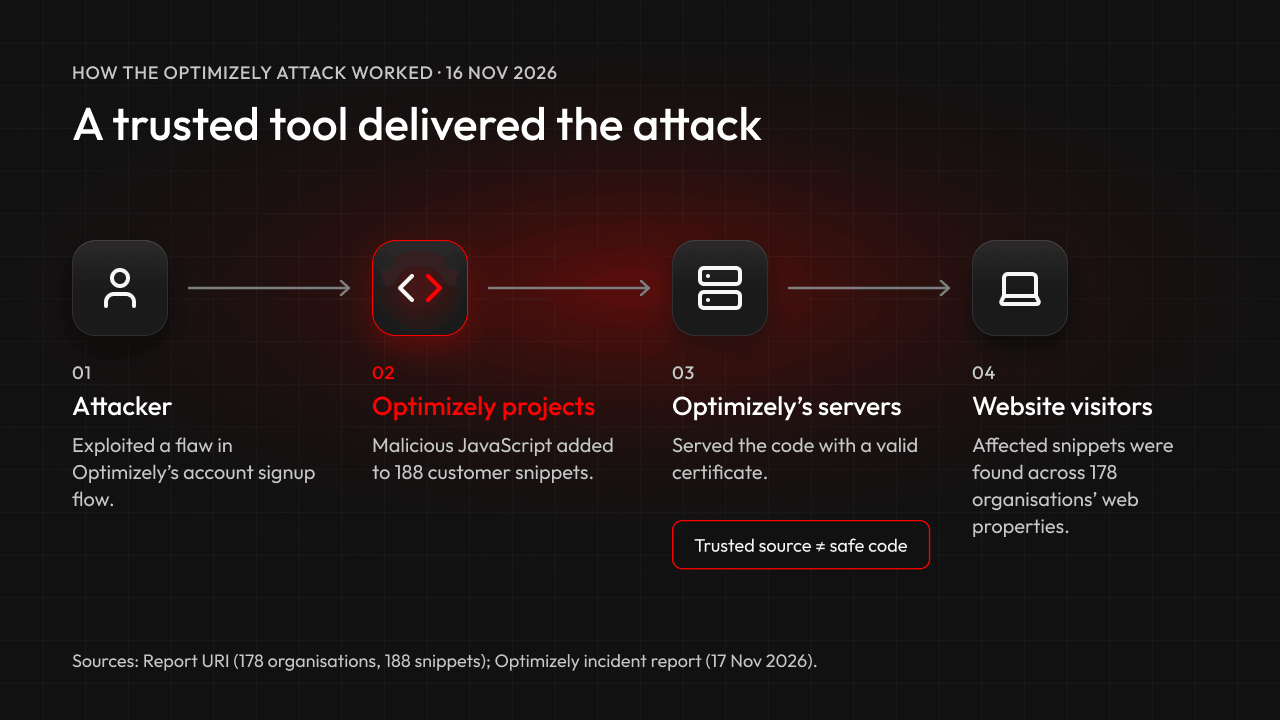
On 16 November 2026, attackers used Optimizely, a website testing tool, to plant malicious code on the web properties of 178 organisations, including the BBC, HSBC and IKEA, according to researchers. The initial compromise was in Optimizely's service. Keeping employees' devices updated would not have prevented that supplier-side breach.
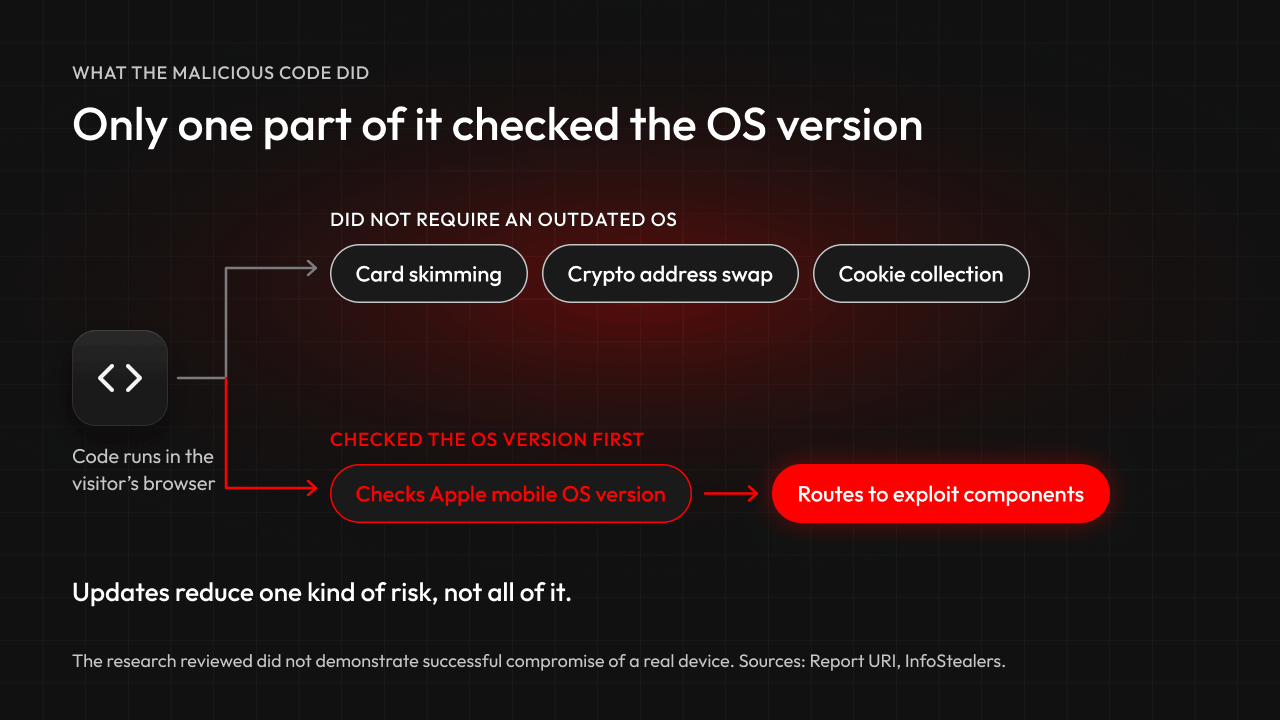
But it's also the latest in a long line of vulnerabilities and exploits made public in recent months, and one detail stands out: one branch of the malicious code checked the visitor's reported iOS version to select exploit components, including kits targeting older iPhones and iPads.
Attackers look for devices that are behind on OS updates. Many IT teams assume Intune and automatic updates keep every laptop current. At Applixure, we often find gaps between the OS versions teams expect and the versions actually running on their devices.
Key facts
- What: a supply chain attack through Optimizely Web Experimentation on 16 November 2026, also called OPTIMJACK.
- Scale: malicious code in 188 Optimizely snippets belonging to 178 organisations, according to Report URI.
- Payloads: card skimming, cryptocurrency address replacement, collection of JavaScript-accessible cookies, and exploit components for Apple mobile devices.
- Device angle: the exploit components checked the device's OS version first and targeted older iPhones and iPads.
- Status: Optimizely says it has fixed the vulnerability, removed the injected code and secured affected accounts.
What happened in the Optimizely supply chain attack?
Attackers abused a vulnerability in Optimizely Web Experimentation to deliver malicious JavaScript through customers' websites on 16 November 2026.
- 178 organisations observed: Researchers at Report URI found the code in 188 Optimizely snippets belonging to 178 organisations, and say the real number is likely higher. Banking and finance was the largest group. Source
- A trusted channel: The code sat in each customer's “Project JavaScript” field and was served from Optimizely's own servers. The valid certificate confirmed where the code came from, not that it was safe.
- Several payloads: The financial-theft components didn't require an outdated OS. A separate Apple mobile branch used OS-version checks to route devices to exploit components, including kits targeting older iOS versions.
- Entry point named: Optimizely says a flaw in its account signup flow let the attacker act as administrator users and edit Project JavaScript. It says it has fixed the vulnerability, removed the injected code, and secured affected accounts. Source
Why does this matter for IT Teams and the computer fleet?
Not because of this attack itself. The way in was a flaw in Optimizely's signup flow, and researchers haven't reported a Mac or Windows exploit.
It matters because it's one more reminder in a busy few months, and the defensive lesson is the same each time: find the devices missing security fixes, and the versions that no longer get them.
- A steady stream of exploited flaws: In October, Microsoft's monthly update fixed a Windows Shell flaw attackers were already exploiting (CVE-2026-96951). In November, it fixed an exploited Outlook flaw (CVE-2026-124194). Sources: October, November
- Version checks guided exploit delivery: The Apple mobile branch used the reported iOS version to select exploit components. The research so far hasn't shown a successful compromise of a real device, but the logic is plain: attackers look for devices that are behind. Source
- Exploits are the most common way in: In the intrusions Google Mandiant investigated for its M-Trends 2026 report, exploits were the top initial infection vector for the sixth year running, at 32%. Source
- Computers hold the keys: An employee's laptop holds email, browser sessions, saved logins and access to your cloud apps. In Verizon's 2025 DBIR analysis of infostealer logs, 46% of compromised systems containing corporate logins were unmanaged. Source
- It only takes one: You don't need to lose the whole fleet to have a serious incident. One computer missing a critical fix can be enough to let an attacker in.
Isn't Intune with automatic updates enough?
Not on their own. Intune and automatic updates give you deployment controls, deadlines, and device-reported status. But a report isn't a check: someone still has to confirm every device is reporting, the data is fresh, and failed installs get fixed.
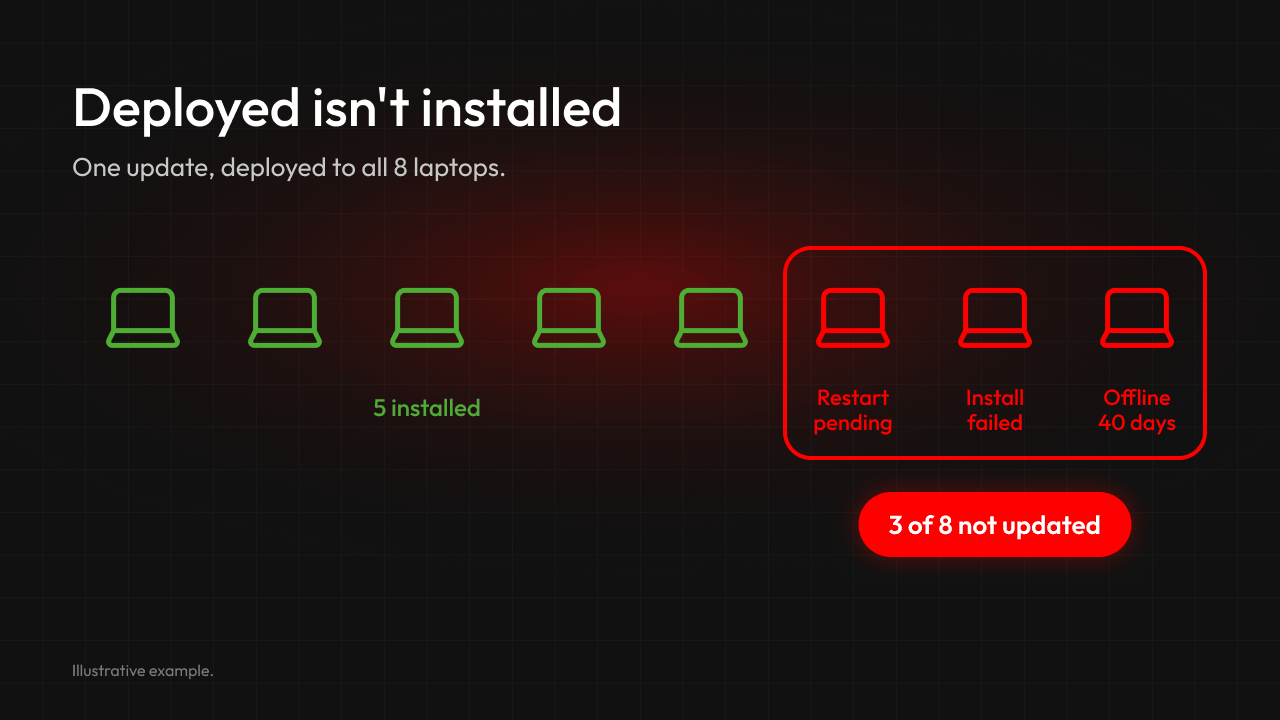
- Deployed isn't installed: Update deadlines and grace periods normally force the restart that completes an install. Where they're loose or not set, an update can be deployed and still sit waiting for a restart. See how Applixure finds devices missing OS security updates
- Updates can fail on the device: When Windows Update fails or updates won't install, the cause can be a corrupted update database or corrupted system files. In our experience, these failures are a common reason devices fall behind and often need hands-on repair, so identify affected devices and follow up.
- Devices go quiet: When a device stops checking in, its management data goes stale and new policy changes may not reach it. Treat the reporting gap as a finding and check whether updates are still being installed.
- Devices disappear from reports: Intune clean-up rules can hide devices that haven't checked in for a set period from the portal and reports. This doesn't wipe or retire them. A hidden device reappears if it checks in before its device certificate expires; after that, it needs to be re-enrolled. Until then, it's missing from the reports you use to check compliance.
- Expected isn't actual: Applixure has surfaced dozens of cases across customer environments where devices that should run Windows 11 Enterprise were still on Pro weeks after deployment, because licensing or activation failed silently. Read the Windows 11 Pro 23H2 warning
- Every report has a timestamp: Device data refreshes on intervals in any tool, Applixure included, and an offline device can't report at all. Check how fresh the data is before you count a device as compliant. Compare Applixure and Intune reporting
How fast do you need to find an outdated computer?
Our recommendation: know within hours which devices are exposed, even if your rollout runs over days or weeks. Phased deployment rings and short deferrals are good practice, because they limit the damage of a bad update. The risk is the devices that fall outside the rollout and never get followed up.
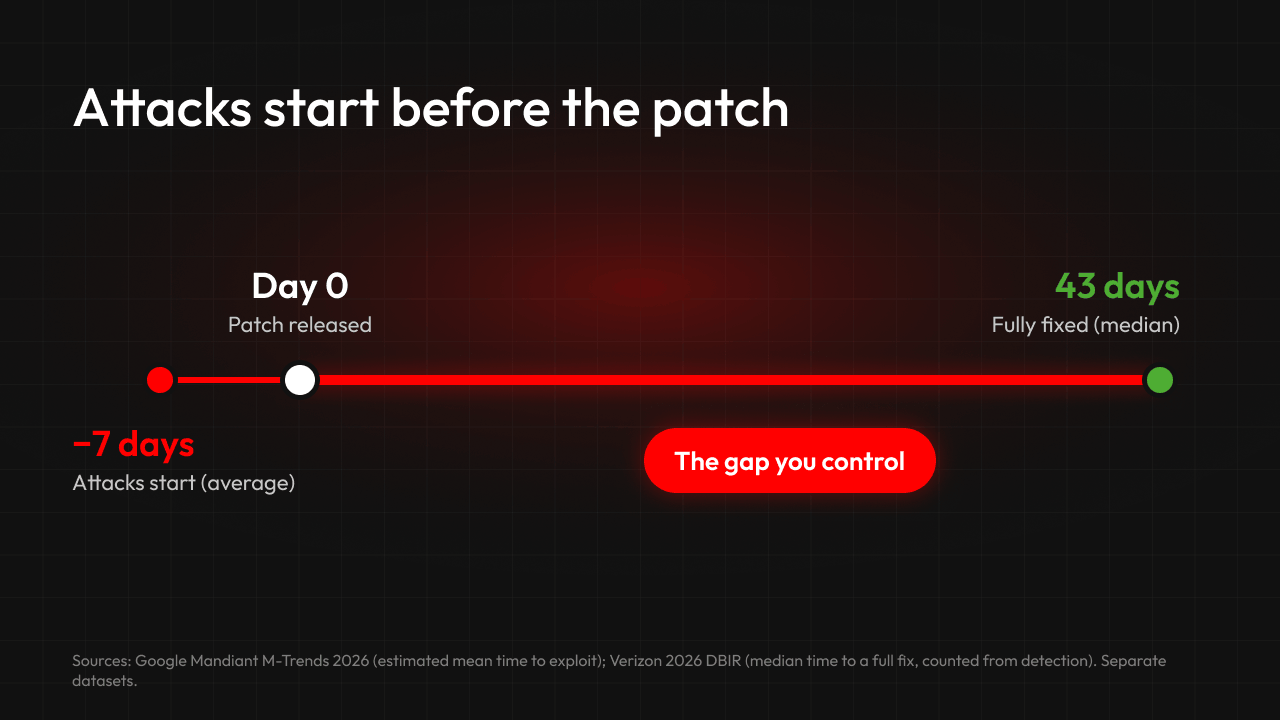
- Exploitation comes first: M-Trends 2026 estimates the mean time to exploit at −7 days: exploitation routinely starts before a patch is released. Patching can't stop a zero-day, but it closes the door once a fix exists. Source
- AI speeds attackers up: Google's threat intelligence researchers report that adversaries are integrating AI to speed up the attack lifecycle. Source
- Full remediation took longer in Verizon's dataset: In the 2026 DBIR's vulnerability-management data, only 26% of observed vulnerabilities in CISA's Known Exploited Vulnerabilities (KEV) catalog were fully remediated. Median time to full remediation was 43 days from initial detection, compared with 32 days in the previous report. Source
How many of your devices run an outdated OS right now?
Here, outdated means running an unsupported OS version or missing relevant security updates. If you can't answer from fresh device data in minutes, that's the gap worth closing.
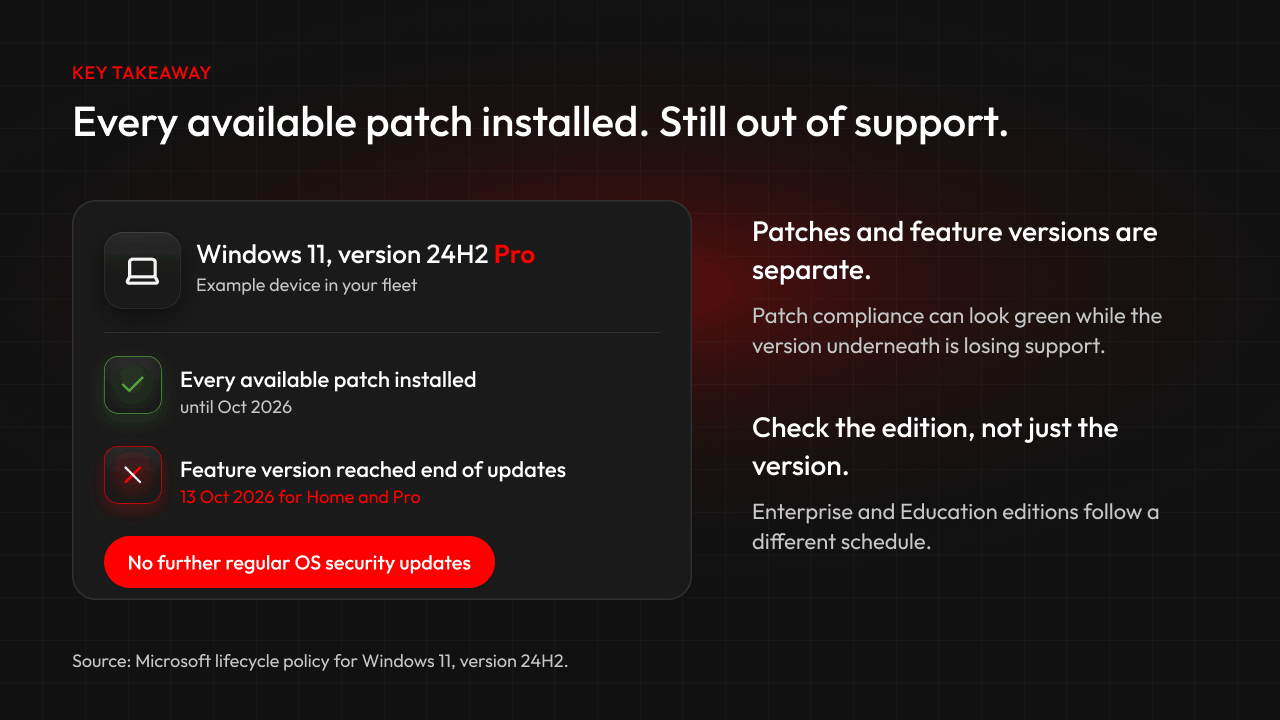
- Feature versions and patches are separate: A device can install every monthly patch and still sit on a feature version that's about to lose support, so patch compliance alone can look better than it is.
- End of support means no more regular security updates: Windows 11 24H2 Home and Pro reached end of updates on 13 October 2026. Check the edition as well as the version, because Enterprise and Education follow a different schedule. See which devices the Windows 11 24H2 end of life affects
- Stragglers are normal: Laptops that are rarely online, failed updates, devices hidden from reports by clean-up rules and forgotten machines slip outside even a good patch process.
- Measure the whole loop: Track how quickly you can identify affected devices, confirm the data is fresh and finish remediation.
Is the OS the only thing you need to verify?
No. Additional applications and parallel versions add to the inventory and maintenance workload, and can leave gaps in patch coverage.
- Version sprawl makes patching harder: Parallel versions of browsers, runtimes and apps each need their own fixes, which can slow remediation. Why version sprawl hurts endpoint quality
- Browser extensions are a blind spot: Depending on their permissions, extensions can access sensitive information in websites and cloud apps. Include them in software inventory and approval controls. Why browser extension visibility matters
- See it across the fleet: Applixure discovers software, browser extensions and OS builds on every monitored device and flags devices on end-of-life OS versions. Software & Version Sprawl Management
- Clean it up: The Eliminate Software Sprawl guide gives IT leaders a four-step approach.
How do you verify that OS updates actually happened?
Your patch management process deploys the updates. There are three common ways to check they actually landed and to follow up on exceptions.
- Option 1: Rely on Intune and automatic updates. Intune's update reports show device-reported status. The risk is in the follow-up: devices that stopped reporting or are hidden from reports, failed updates and restarts that never happen can sit unnoticed unless someone checks.
- Option 2: Periodic manual audits. Exports and spreadsheets give you a point-in-time snapshot that can become outdated as devices change.
- Option 3 (Recommended): Verify with Analytics and Workflow alongside Intune.
Applixure Analytics gives your IT team an independent view of OS versions, updates, encryption and security configuration on monitored devices, based on the latest reported data, so you can verify what Intune reports and spot outdated software versions.
With Applixure Workflow, you set the standards: it flags devices that fall below them and routes them to your ITSM or ticketing tool for your team to fix.
RSM Netherlands says it went from 0% visibility to a complete, current software inventory. When a vulnerability is announced, the team now has a clear view of version distribution across the fleet within seconds. Read the RSM Netherlands case
“It gives us insights from nothing to everything.” Guido Lambertij, IT Architect, RSM Netherlands

How do you find devices running an outdated OS?
Three steps, whatever the next headline is.
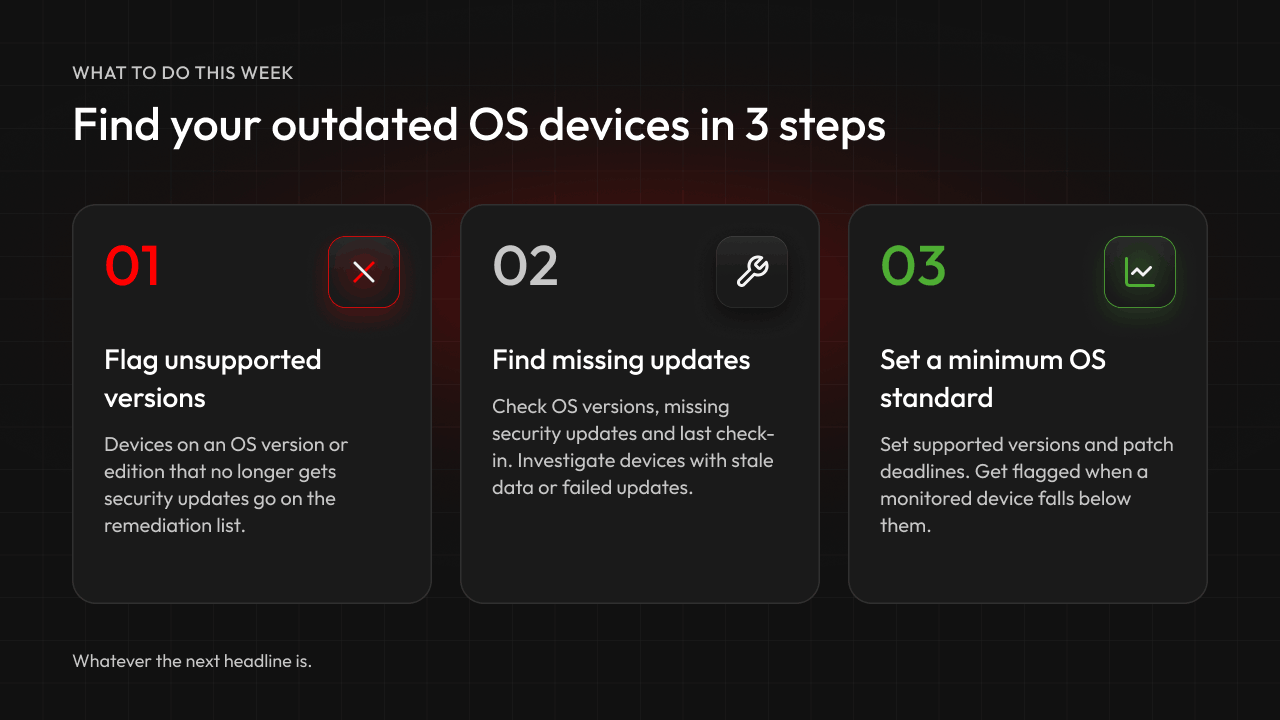
- Flag devices on an unsupported OS version or edition: Put them on the remediation list, alongside devices missing fixes for actively exploited vulnerabilities.
- Don't take “compliant” at face value: Check feature versions, monthly patches, pending restarts and last check-in on the device itself. Note why each device is behind: offline, stuck, failing updates, hidden from reports or forgotten.
- Set a minimum OS standard and track it: Set supported versions and patch deadlines, and get flagged when a monitored device falls below them.
Want to see a real example? Book a demo to see how Applixure identifies outdated OS versions and missing security updates across a monitored fleet.
Devices quietly falling behind is a recurring theme. The same visibility problem applies to devices that still lack the replacement Secure Boot certificates after the 2026 expiry dates.
Want to know which of your computers really run an outdated OS?
Use Applixure alongside Intune to see which devices are missing updates or running unsupported OS versions, and prioritise follow-up. Book a demo with Applixure.
Prefer to read first? Download the Key Quality Metrics Guide.
FAQ
What was the Optimizely hack?
The Optimizely hack was a supply chain attack on 16 November 2026. Attackers used a vulnerability in Optimizely Web Experimentation to inject malicious JavaScript into customer projects. Researchers found it in 188 snippets belonging to 178 organisations. Some researchers call the campaign OPTIMJACK.
Which companies were affected by the Optimizely attack?
Named organisations include the BBC, CNN, Zoom, Salesforce, GitLab, IKEA, HSBC, Equifax, Air France-KLM and TalkTalk. The findings concern malicious code delivered through affected web properties. They don't establish that those organisations' wider systems were compromised. Researchers say the real count is likely higher.
Were any devices compromised in the Optimizely attack?
Researchers identified exploit components aimed at older iPhone and iPad versions. Delivering exploit code doesn't establish a compromise, and the research so far hasn't shown a real device being compromised.
Could Applixure have prevented the Optimizely attack?
No. Applixure would not have prevented the vulnerability in Optimizely's service from being exploited. Its role is to help IT teams identify unsupported OS versions, missing updates and devices that fall below their standards.
Is Intune enough to keep computers up to date?
Intune and automatic updates are a good baseline, but they don't guarantee every device is updated. Installs can wait on a restart where deadlines are loose, updates can fail on the device, and devices that stop checking in leave you with stale data or are hidden from reports by a clean-up rule. Check reporting coverage, data freshness and failed installs, and follow up on every exception.
What should Optimizely customers do now?
Preserve evidence, including historical script versions. Check project code, experiments and cached copies for unknown scripts, and review which sensitive pages loaded the affected code. Follow Optimizely's latest incident guidance: it says password resets and API-token regeneration aren't needed for this incident, but investigate any separate signs of account compromise. Optimizely also recommends removing its snippet from pages that handle sensitive data where you don't run experiments. Source
How do you protect against supply chain attacks like this one?
You can't stop every supplier from being breached, but you can limit the impact. On your websites, remove unnecessary third-party scripts from sensitive pages such as checkout, monitor the ones that remain, and configure and test a restrictive Content Security Policy. On your computers, keep every device on a supported, updated OS, and regularly check which devices aren't.
What is the CISA KEV catalog?
The Known Exploited Vulnerabilities (KEV) catalog is a list kept by the US Cybersecurity and Infrastructure Security Agency (CISA) of vulnerabilities with evidence of active exploitation. In Verizon's 2026 DBIR dataset, only 26% of KEV vulnerabilities were fully remediated.
Stay Ahead in IT
Get monthly insights and guides for smarter IT management
No spam. Unsubscribe anytime.